Every tenancy document, in one safe place.

RentBox keeps Gas Safety, EICR, EPC and tenancy paperwork organised, reminds you before anything expires and shares documents with your tenants in a tap. The files stay in your own Google Drive.

Get it on Google Play

Android app for UK landlords. Tenants use it free on Android, or in the browser on iPhone, iPad and laptop at pwa.rentbox.smartbronte.uk. Landlords get 60 days of full access, no card needed.
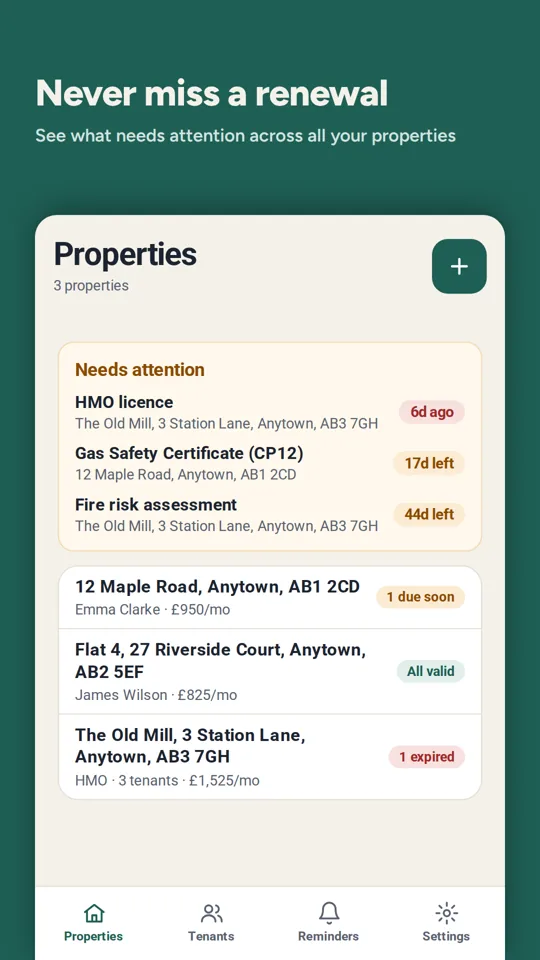
RentBox Properties screen showing certificates that need attention across three properties

Built for both sides of the tenancy

The landlord keeps the records. The tenant always has the documents they are entitled to see.

For landlords

Everything about each property, in one organised place.

  • Store Gas Safety, EICR, EPC, deposit and tenancy documents per property and tenant.
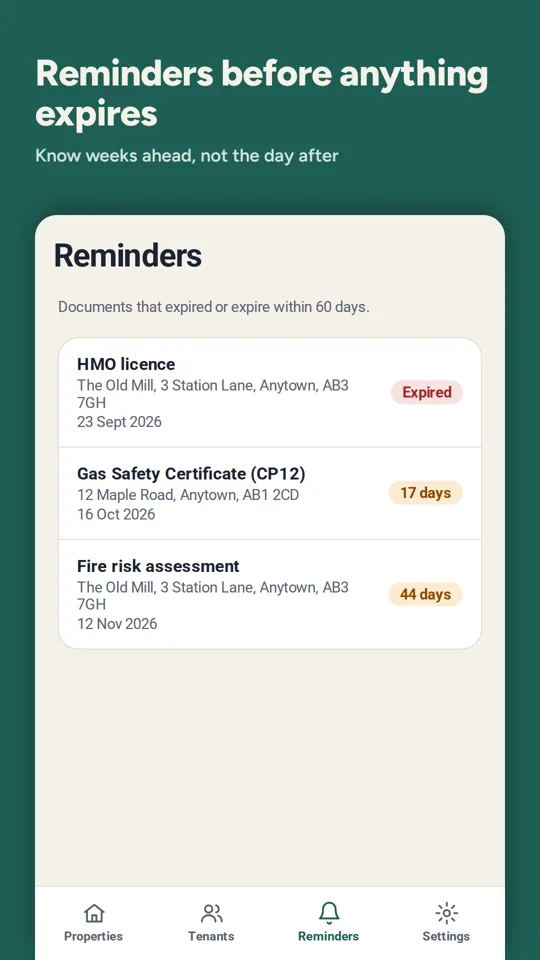
  • See everything that has expired or expires in the next 60 days in one list, with notifications 30 days and 7 days before and on the day. Upload the renewed certificate and the old one stays in the history.
  • Record rent, deposit, tenancy start date and your contact address for notices.
  • Manage several properties, current tenants and former tenants whose records you still need to keep.
  • Choose exactly which documents each tenant can see.

For tenants

Free, and no more chasing your landlord for paperwork.

  • Use the Android app, or open RentBox on the web on an iPhone, iPad or laptop and add it to your home screen.
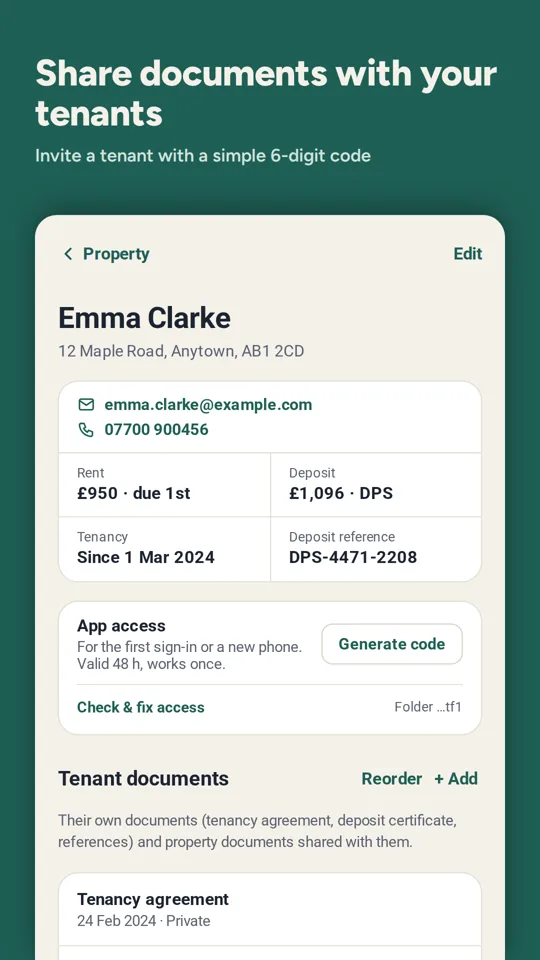
  • Connect once with the 6-digit code your landlord gives you.
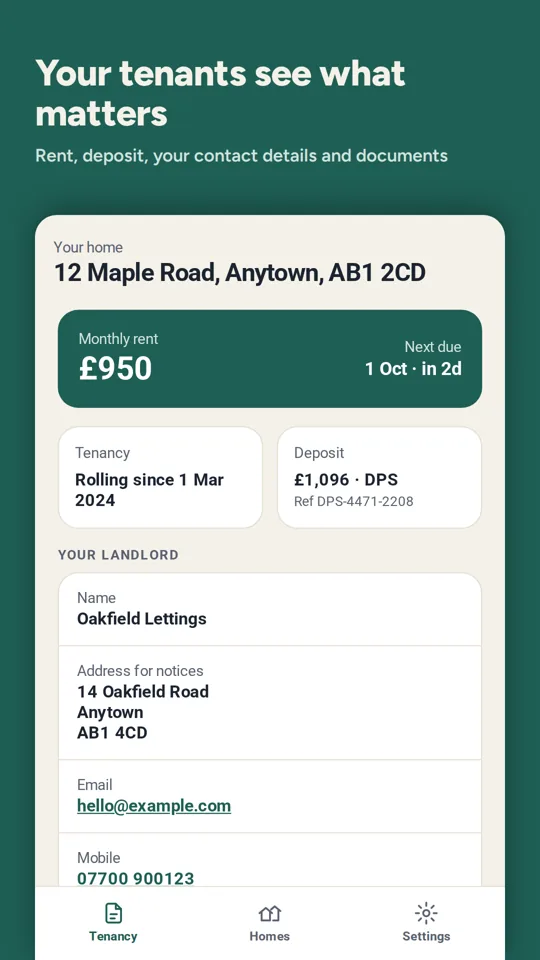
  • See your tenancy agreement, certificates and deposit details any time.
  • Get a notification when your landlord shares a new document, in the Android app or the web app. The Android app also reminds you 2 days before rent is due.
  • Have your landlord's contact details to hand.

A look inside the app

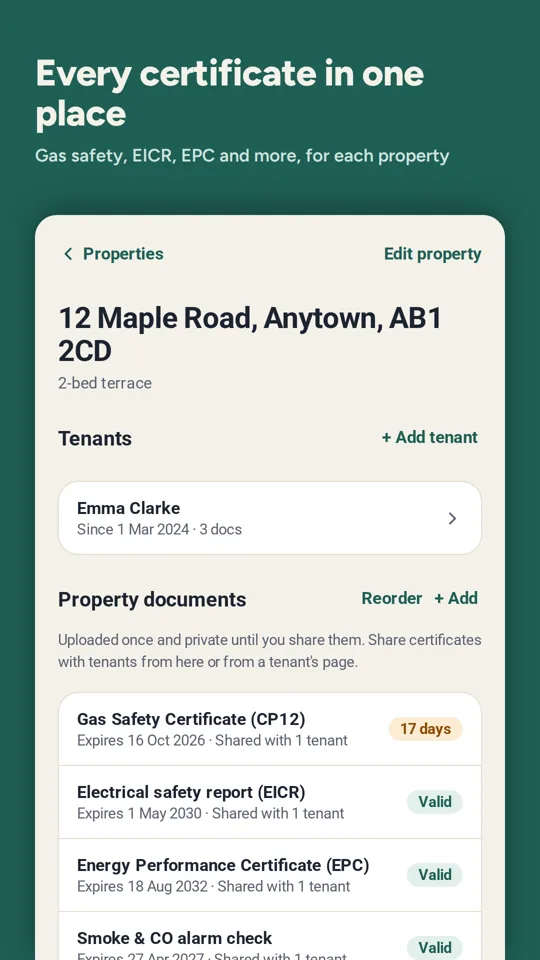
Property page with Gas Safety, EICR, EPC and alarm check certificates and their expiry dates
Reminders screen listing documents that expired or expire within 60 days
Tenant details with rent, deposit, tenancy start and a button to generate an invite code
Tenant view showing monthly rent, next due date, deposit and landlord contact details
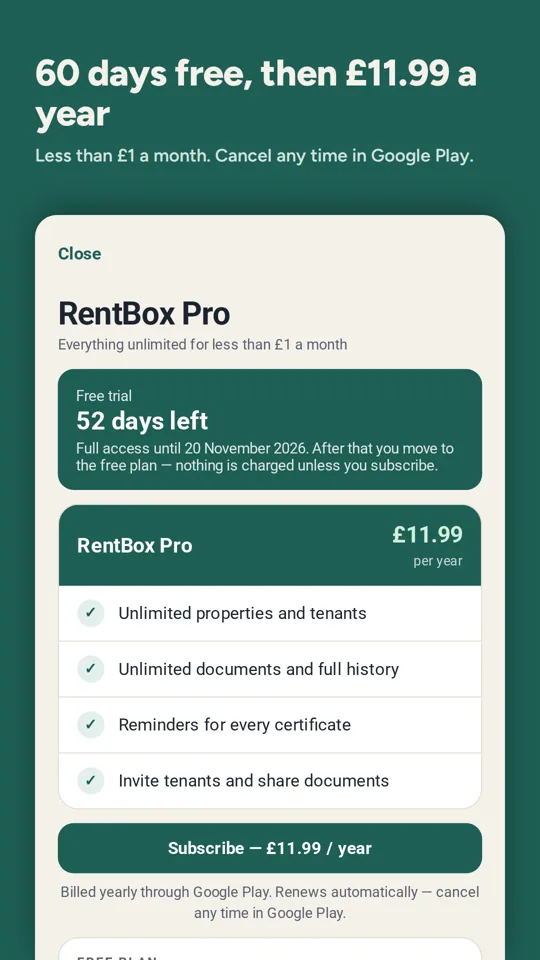
RentBox Pro screen: 60 days free, then £11.99 a year

Scroll sideways to see more screens.

How it works

  1. Sign in with Google

    Landlords and tenants use their existing Google account. There are no new passwords to remember.

  2. Add a property and tenant

    Enter the address, tenant details, rent and deposit. RentBox creates a folder for the property in your Google Drive.

  3. Upload documents once

    Add certificates and tenancy documents with their expiry dates, and choose which ones the tenant can see.

  4. Give your tenant the invite code

    The tenant enters the 6-digit code once and their documents appear in the app.

  5. Renew on time

    You get notified 30 days and 7 days before a certificate expires. Upload the new one and the old version stays in the history.

Pricing

Tenants never pay. Landlords can try everything for 60 days before deciding.

Free trial

60 days
For new landlords, no card needed
  • Every feature unlocked
  • Unlimited properties, tenants and documents
  • Reminders before it ends

Free plan

£0
After the trial, if you don't subscribe
  • 1 property and 1 tenant
  • 3 documents and 1 reminder
  • Everything else is kept, locked until you subscribe

RentBox Pro

£11.99
per year, billed through Google Play
  • Unlimited properties and tenants
  • Unlimited documents and reminders
  • Tenant access always included

The subscription renews automatically each year until you cancel it in Google Play (Play Store › Payments and subscriptions › Subscriptions). Cancelling stops the next renewal; you keep Pro until the end of the period you paid for. Prices include VAT where applicable. Full details are in the Terms of Use.

Your documents stay in your Drive

RentBox saves documents and tenancy details in the landlord's own Google Drive. smartbronte.uk, the developer of RentBox, cannot open those files.

Our servers hold only the small amount of data the app needs to run. The landlord decides what is stored about their tenants and is responsible for it.

Read the Privacy Policy

In the landlord's Google Drive
Documents, property and tenant details, rent and deposit information.
On our servers (Google Firebase)
For landlords: the date your free trial started, stored under a one-way hash of your email address, not the email itself.
On our servers (Cloudflare)
Invite codes, deleted after use or 48 hours, and tenants' notification tokens.
With Google Play
Subscription payments and status. The app checks your subscription with Google Play on your phone. We never see your card details.

Questions

Does my tenant need to pay or have an Android phone?

No. Tenants use RentBox for free. On an Android phone or tablet they install the app from Google Play. On an iPhone, iPad or laptop they open pwa.rentbox.smartbronte.uk in the browser, sign in with Google and enter the invite code. On an iPhone or iPad, tap Share and then Add to Home Screen to use it like an app. Landlords currently need an Android phone.

What happens when my free trial ends?

You move to the free plan: one property, one tenant, three documents and one reminder stay active. Everything else is kept but locked until you subscribe to RentBox Pro. Nothing is deleted.

Can smartbronte.uk see my documents?

No. Documents and tenancy details are stored in your own Google Drive, in folders RentBox creates. Our servers only hold the start date of your free trial (under a one-way hash of your email), invite codes and tenants' notification tokens.

Does RentBox tell me what the law requires?

RentBox helps you keep track of documents and dates. It is not legal advice, and it does not check whether your tenancy meets every legal requirement. Always check current guidance on GOV.UK or with a qualified adviser.

How do I cancel my subscription?

Open the Play Store, tap your profile picture, then Payments and subscriptions › Subscriptions › RentBox › Cancel. Uninstalling the app does not cancel it.

How do I delete my account?

In the app go to Settings › Delete account, or email us. See Account deletion for what is deleted and what is kept.